
MAI Motion System
This work represents my contribution to the Motion portion of the Microsoft AI Design System — a collection of projects that together shaped how digital products move, feel, and behave across the entire Microsoft ecosystem.
Chapter 01
Motion Principles

At the foundation of any great design system is a set of principles — consistent across every surface, yet flexible enough to evolve. MAI Motion is a purposeful, intuitive motion system built for AI experiences across web and mobile, designed to enhance interactions with clarity, delight, and sophistication.

Simple + Consistent
MAI UI Motion is simple, responsive and intuitive. It reinforces our system layers, and feels natural across product surfaces. It is neither overwhelming nor superfluous.
Purposeful
MAI UI motion helps to guide users and reinforce UX behaviors, ensuring that they intuitively understand UI behavior throughout the experience.


Fluid
Our default transitions are smooth and elegant, utilizing secondary motion to create a pleasing cadence, and adding a sense of physicality to our designs.
Approachable
In addition to our fluid transitions, we also employ an overshoot easing curve to create a sense of enthusiastic physicality.


Choreography, secondary motion, and depth work together to create a natural, layered sense of movement throughout the interface. Offset and delay guide attention step by step — softening loading moments, drawing the eye to key elements, and preventing simultaneous movement from overwhelming the user. Secondary content follows with a delayed cadence that adds physicality and rhythm, while lists that extend beyond the fold use translated motion with staggered delay to signal more content and lead the eye naturally downward.
Chapter 02
Defining Easing & Duration
Easing and duration are the backbone of meaningful motion — they define how transitions feel, not just how they look. I hand-curated this range to match the character of the MAI design system: simple and sophisticated, with enough breadth to serve a wide variety of components while remaining modular enough to grow. The right combination makes interactions feel intuitive and elegant, transforming functionality into something that genuinely reflects the system's personality.

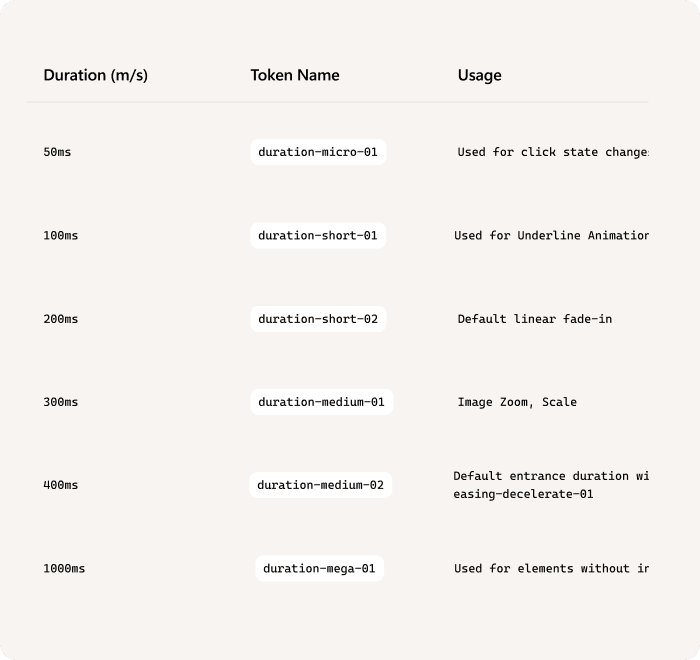
Vibe Coded Motion Visualizer
Try out the tool for yourself!
Chapter 03
Animating Components
With the principles set and the tokens defined, it was time to apply them. This chapter is about bringing the system's components to life — making sure that despite their differences in function and weight, they move as one cohesive family. The goal: breathing room and a sense of performance in equal measure.
Component
Cards
Component
Cards List
Component
Shimmer
Component
Drawers
Component
Accordian
Component
Drawers
Component
Switch
Component
Misc.
Chapter 04
Orchestrating Together
Out of a sea of animated screens… These were amongst my favorites of motion in action.
Chapter 05
Documentation
Documentation is a foundational layer of the MAI Motion System — without it, the work stops at design and never fully lands with the teams who need to implement it. After defining the principles, building the token architecture, and translating motion into code, we needed a single source of truth that partner teams could come to on their own without having to track down the right person or dig through scattered files. Our internal site serves that role, giving teams direct access to motion principles, easing and duration tokens, usage guidelines for when and where to apply them, and concrete examples they can reference and build from. It turns the system from a design artifact into something teams can actually act on.